One system. Every part of the job.

Requests, contractors, maintenance, rosters, assets, forms, client portals and invoices share one record. Here is each part, with the product on screen.

Every job on a board, start to finish.

Requests, work orders and approvals run on workflows you set up. Each job has one page for its contractor, tasks, work log, costs, documents and chat.

  • Requests from the portal. Your client raises the job with the site, the asset, a photo and the priority.
  • Approved before work starts. Approve a request and Eaco matches a contractor from your network, or pick one yourself and set a maximum price.
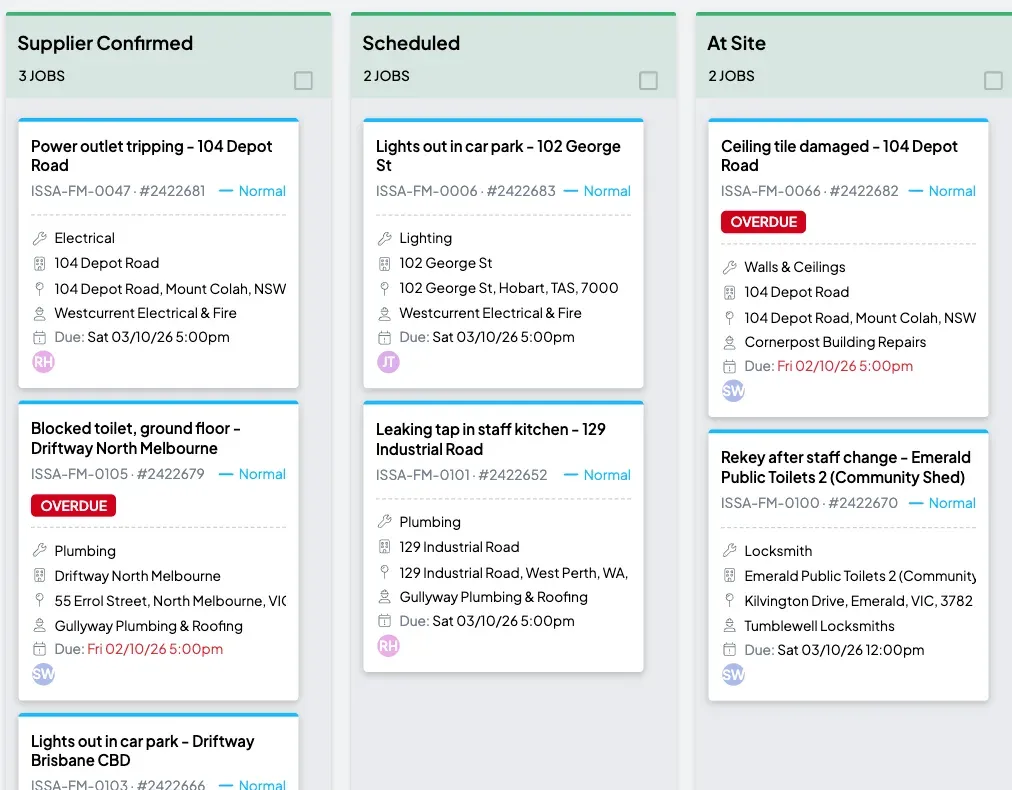
  • A board for each workflow. Stages are columns, jobs are cards, and overdue work is marked.
  • A priority and a due date on every job. See what was completed on time and what is overdue.
Three columns of a workflow board for reactive jobs: supplier confirmed, scheduled and at site. Each card shows the trade, the site, the contractor and the due date, and three are marked overdue.
Reactive jobs on a workflow board, one column for each stage. Example data.

Every contractor checked before they start.

Your contractors work in Eaco under their own logins. Set the insurances, licences and inductions a job needs, and a contractor whose cover has lapsed is refused when they try to accept it.

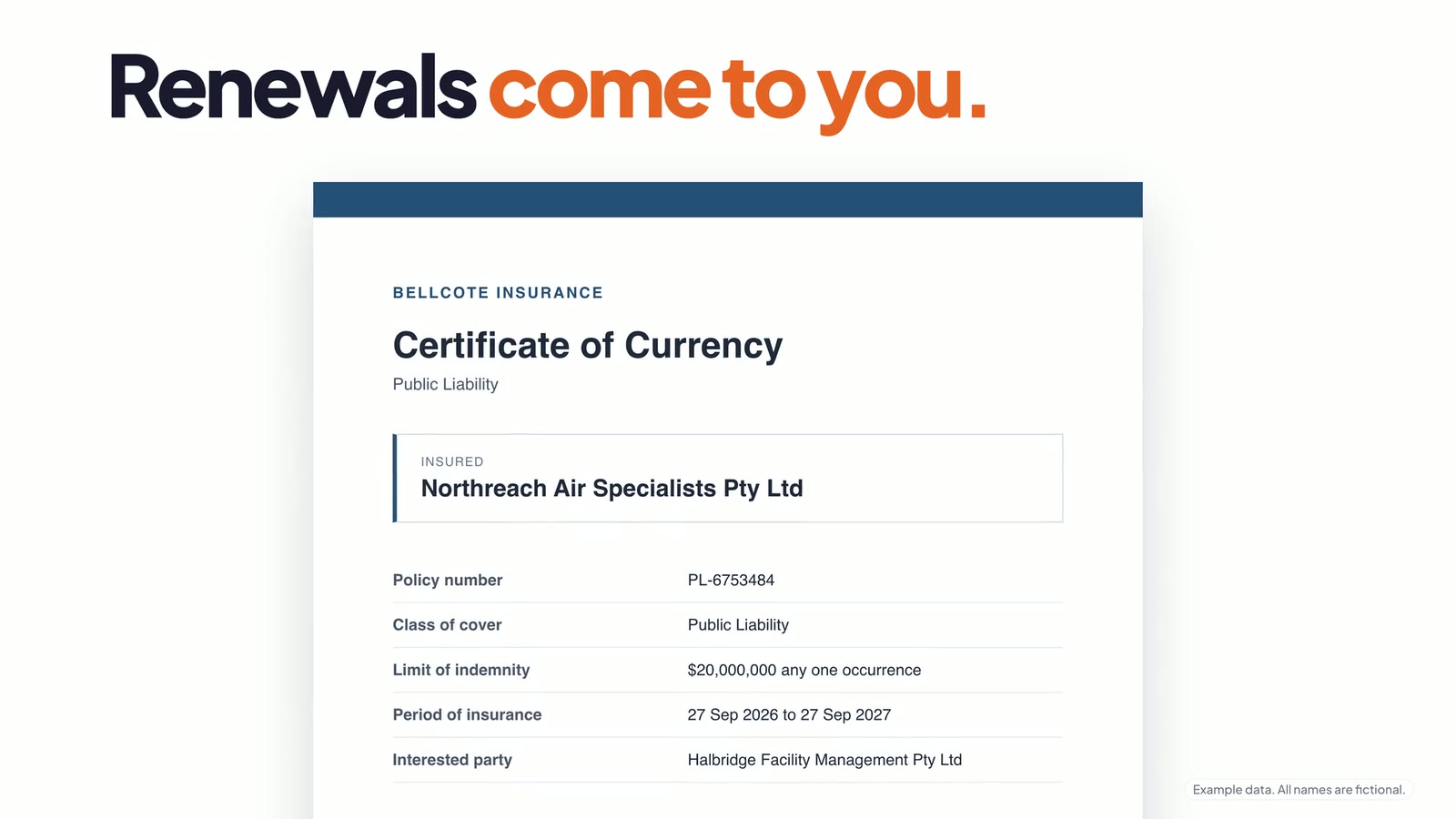
  • Renewals come to you. A new certificate lands in your queue, where you check it and mark it verified.
  • Accepted, scheduled, on site. The contractor accepts the job, gives an ETA and checks in, and the job moves stage as they do.
  • Chat on the job. Message the contractor from the job and get photos back from site.
  • Bills in. Contractors invoice through Eaco, or you upload their bill and Eaco AI reads the number, due date and total for you to check.

Lapsed insurance. No job.

Expired cover is refused automatically. Once the renewal is verified, the contractor can accept work again.

Agreed rates on every job

A schedule of rates holds a buy rate and a sell rate for each line, ready for quotes and invoices.
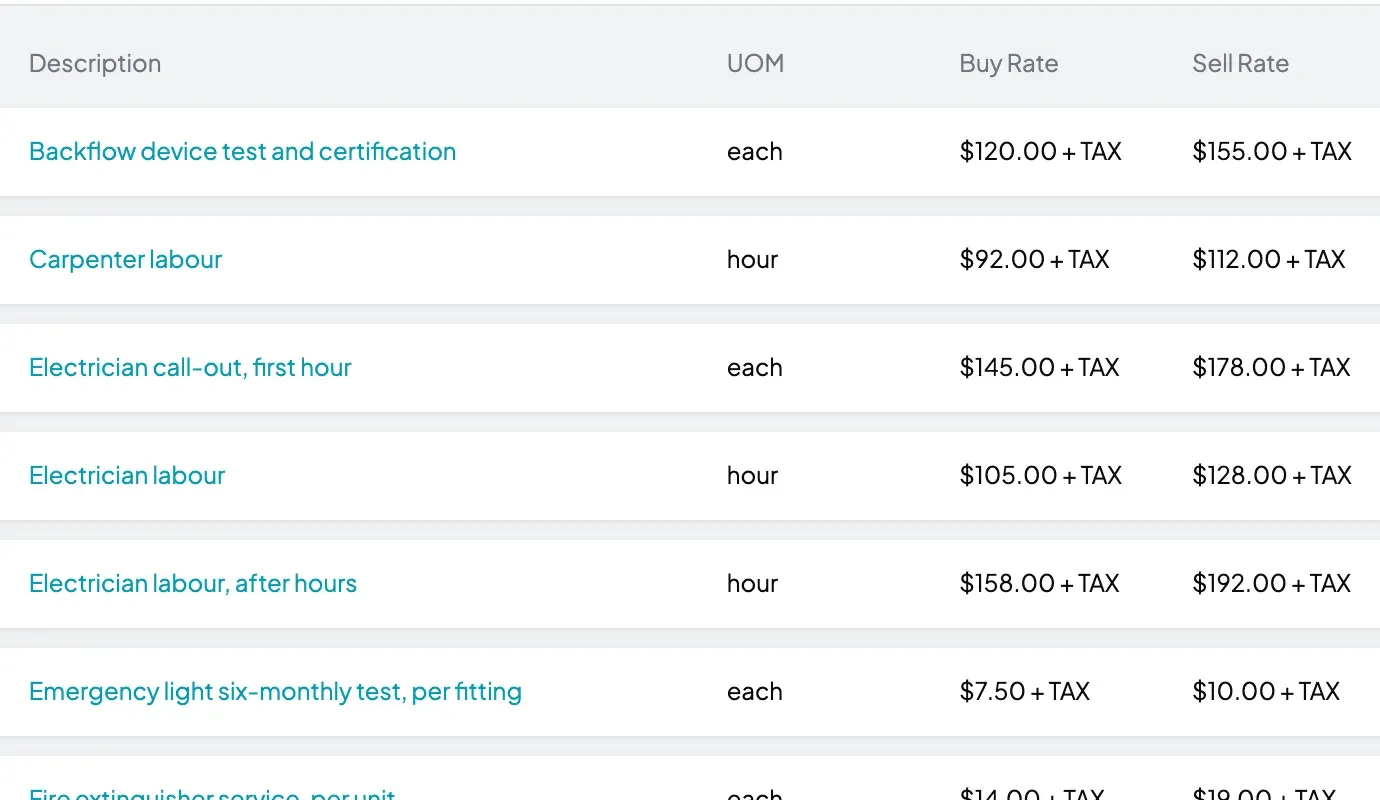
Example dataA schedule of rates listing labour, call-out and service lines, each with a unit, a buy rate and a sell rate.

Planned maintenance that reports itself.

Set a programme once: the service, how often, which sites and who does the work. Eaco raises each visit as a job before it is due, and the report fills in as visits are closed out.
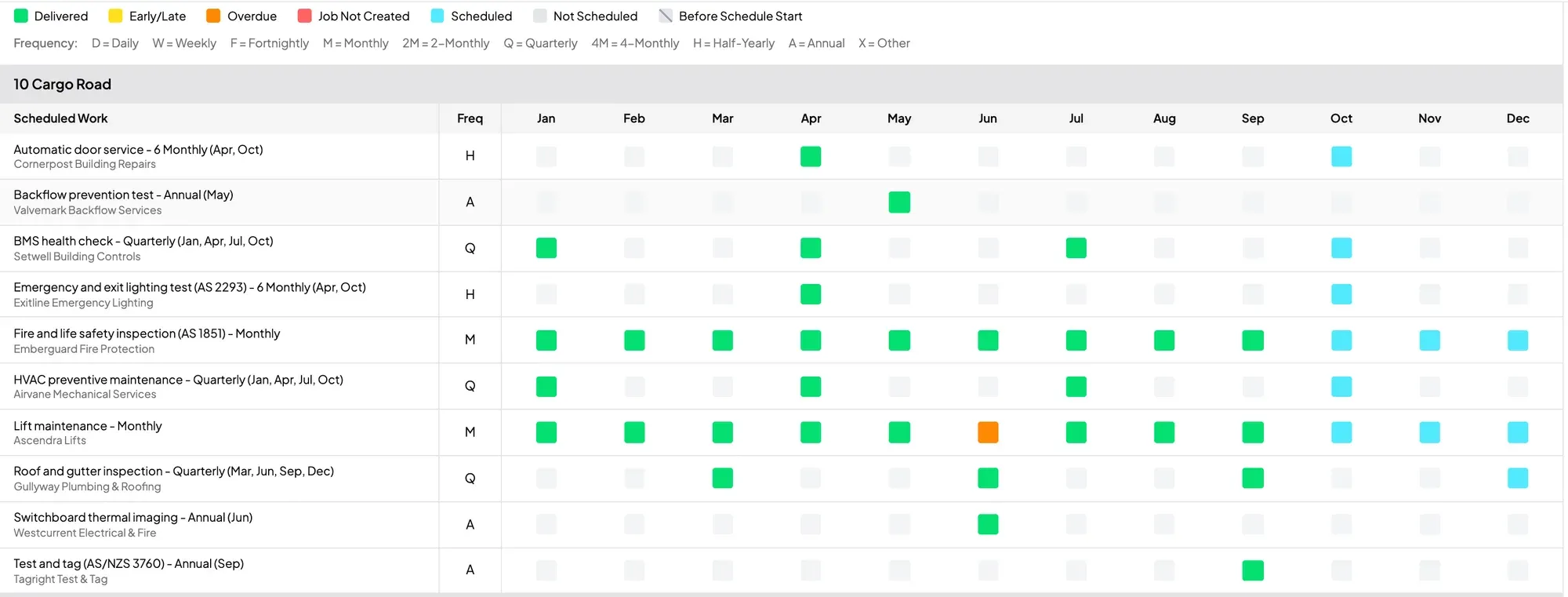
A planned maintenance report for one site: a row for each service, a column for each month, and a coloured cell for every visit that was delivered, late, overdue or scheduled.
The planned maintenance report for one site. Example data.
  • Every service, every site. Monthly, quarterly, six-monthly and annual programmes, delivered by a contractor or by your own staff.
  • Delivered, late or overdue. Each visit is a coloured cell, so a missed service shows up without anyone compiling a report.
  • Your client sees the same grid. The report is in their portal.
  • Periodicals for cleaning. Window cleans, carpet extraction and pressure washing are booked the same way.

From the roster to the timesheet.

Build the week, publish it and see who is on site as shifts start. Check-ins record where and when, and the hours are on a timesheet when the shift ends.
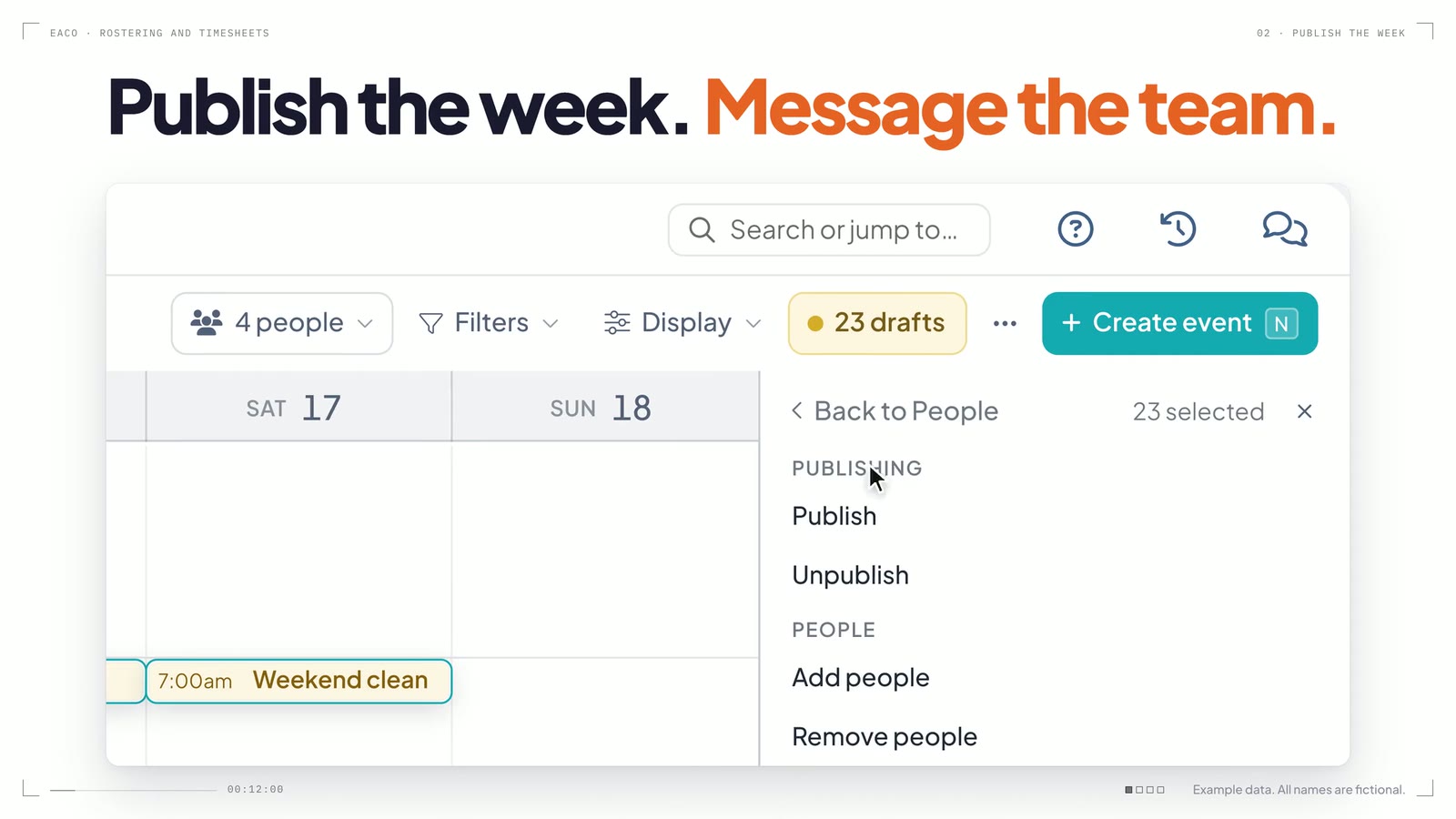
  • Publish the week. Message the team. Draft shifts go live together, with a message to the people on them if you choose.
  • Live time and attendance. Not checked in, late start, overtime and no-show are flagged while there is still time to cover the shift.
  • GPS check-ins and geofencing. Staff check in on their phone at the site. With geofencing on, a check-in away from the site is flagged.
  • Check out, and the timesheet writes itself. Approve the week in one go and download a PDF for each person.
A frame from the film “From the roster to the timesheet.”
From the roster to the timesheet. Publish the week, message the team, and each check-out writes the timesheet.

Know what to replace, and when.

Every property with its client and site contact, on a map and in a list. Every asset in a register by building system, with its condition, its inspections and its replacement date.

  • Condition over time. Each reading is kept, so you can watch an asset go from good to poor.
  • Risk, remaining life and replacement cost. On the asset, beside what its planned maintenance costs each year.
  • Inspection rounds. Raise a round of inspections in one go and see what is due and what is overdue.
  • QR codes. Print codes and tie each one to an asset, a site or a form. A code can point somewhere new without being reprinted.

Every site on the map

Zoom from the whole portfolio down to one street, or search for a property by name.
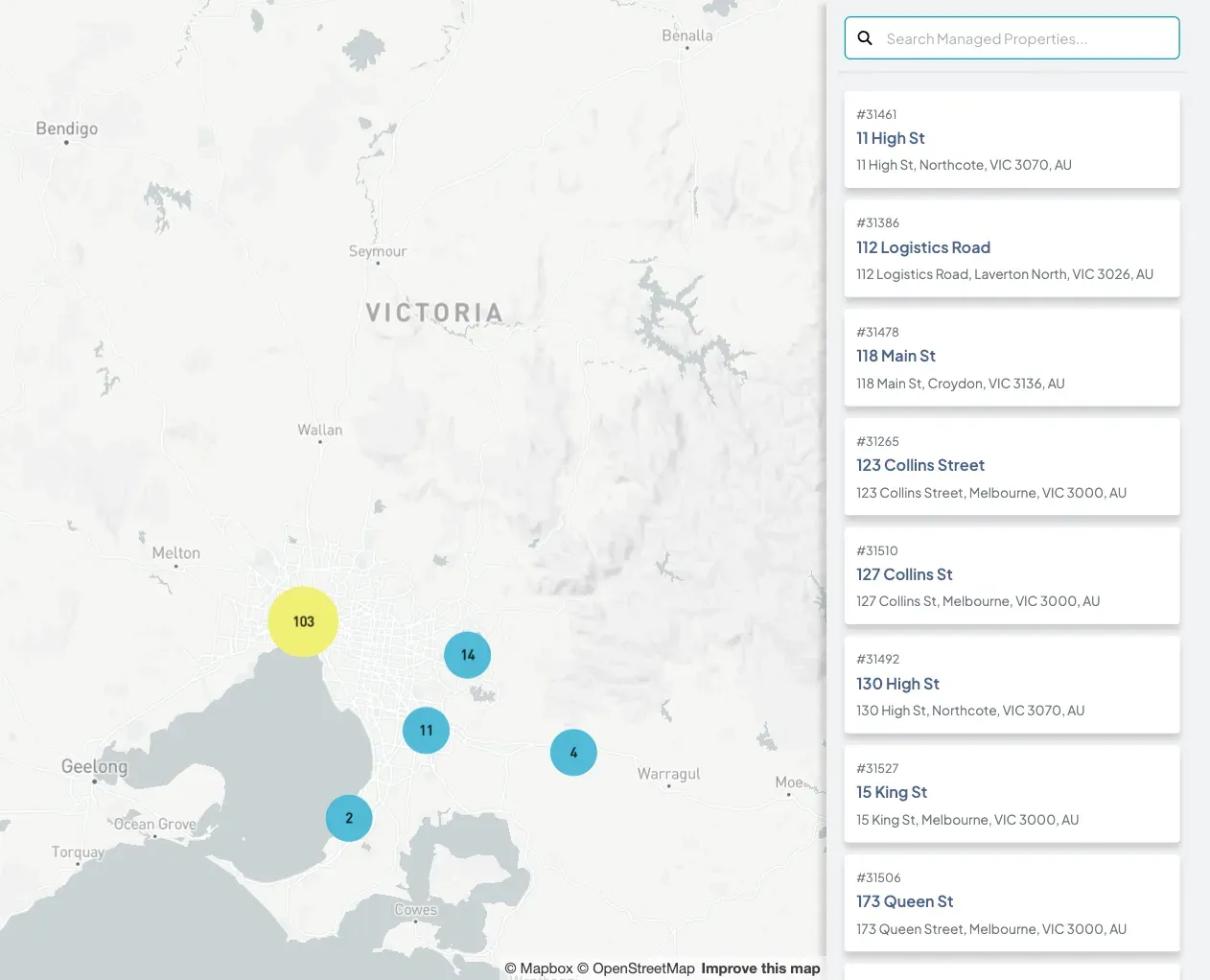
Example dataA map of Melbourne with clusters of managed properties, beside a searchable list of the properties and their addresses.

One page for each asset

Here, a standby generator: its condition readings, its risk score and the date it is due for replacement.
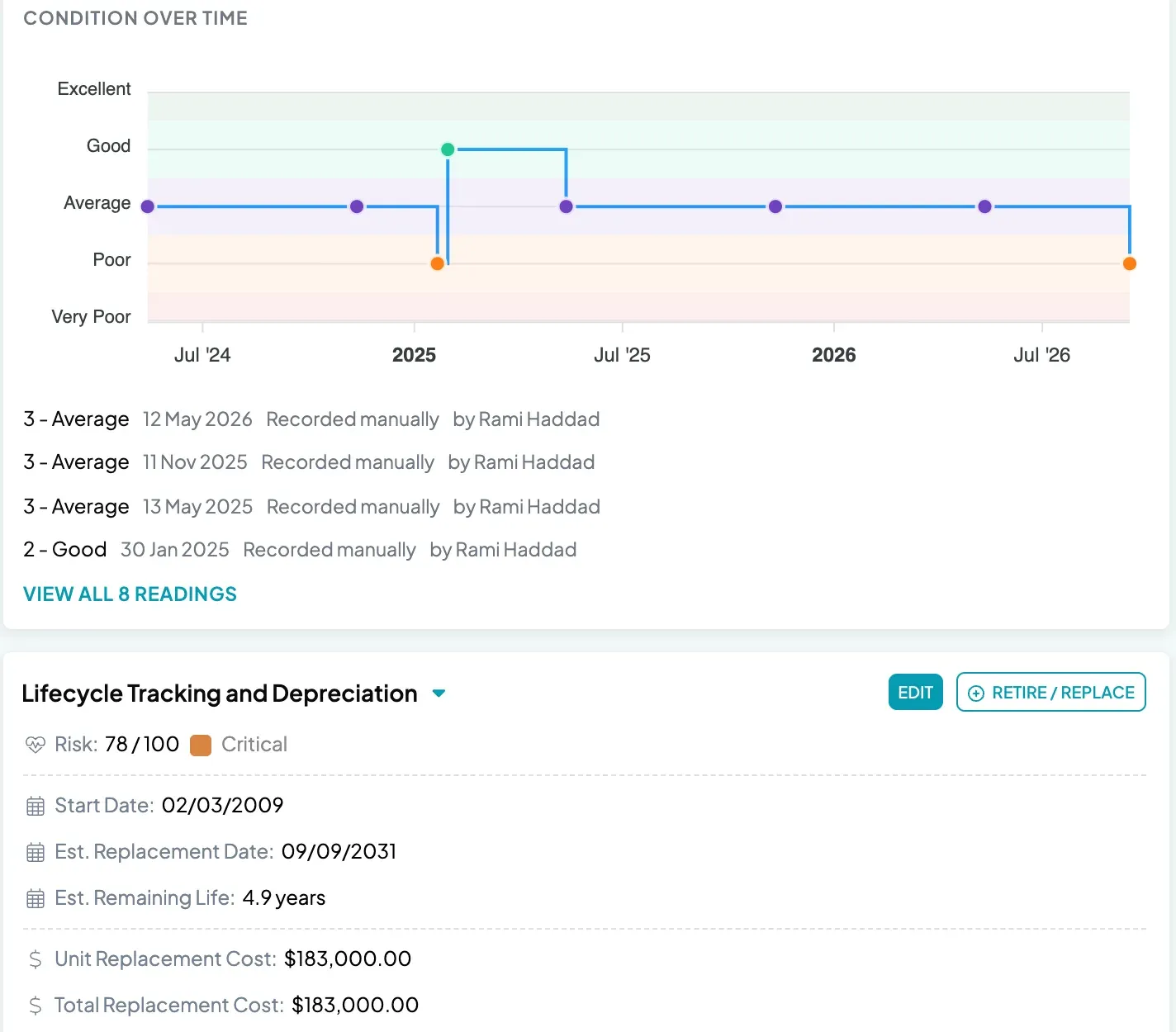
Example dataAn asset page for a standby diesel generator: a chart of its condition over two years, then its risk score, start date, estimated replacement date and remaining life.

Build it. Fill it. Prove it.

Audits, inspections, SWMS and inductions. Drag in the fields the job needs, or describe the form and Eaco AI builds a draft for you to check and publish.

Try Eaco Forms free

Opens eaco.ai. No card needed to start.
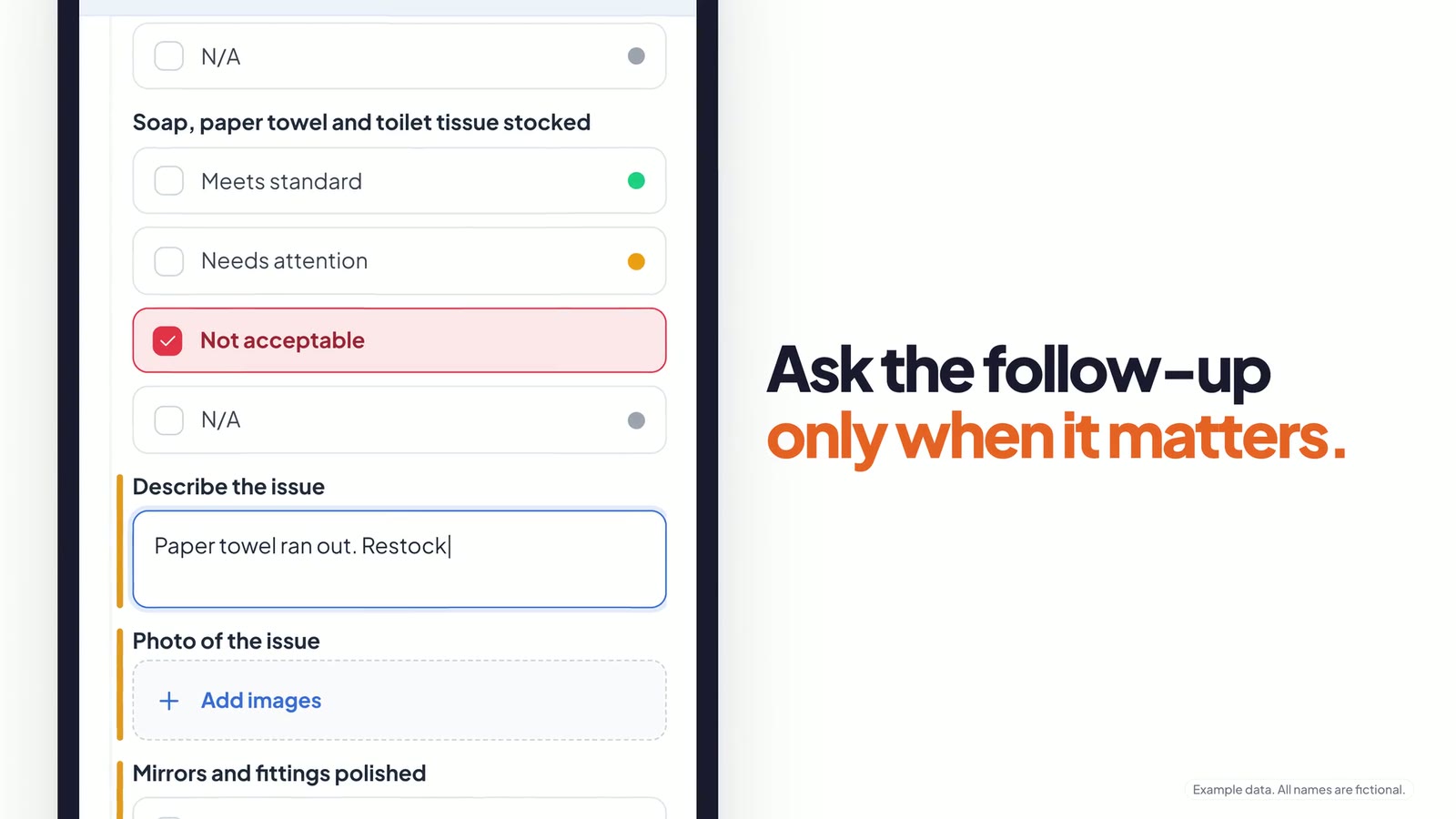
A frame from the film “Build it. Fill it. Prove it.”
Build it. Fill it. Prove it. A paper audit becomes a scored form with photos, a signature and a client sign-off.
  • Type it, snap it, send the PDF, or say it. Eaco AI builds from a few words, a photo of the paper form, a PDF or a voice memo.
  • Reported on site. By voice. Say what happened and the answers are matched to the form. You check them before they land.
  • Every answer scored. Every problem flagged. A flagged answer can email the right person when the form is submitted.
  • The right form, where the work is. Attach a form to a shift or a job, or share a link that needs no account.
  • Proof in the form. Photo and signature fields, a time stamp on every submission and a PDF report for every response.
  • Your client signs it off. Satisfactory or not, with the verdict kept on the response.

Your client sees every visit. Without asking.

A portal under your name, where clients see what is coming, read every report, sign off the work and raise requests themselves.
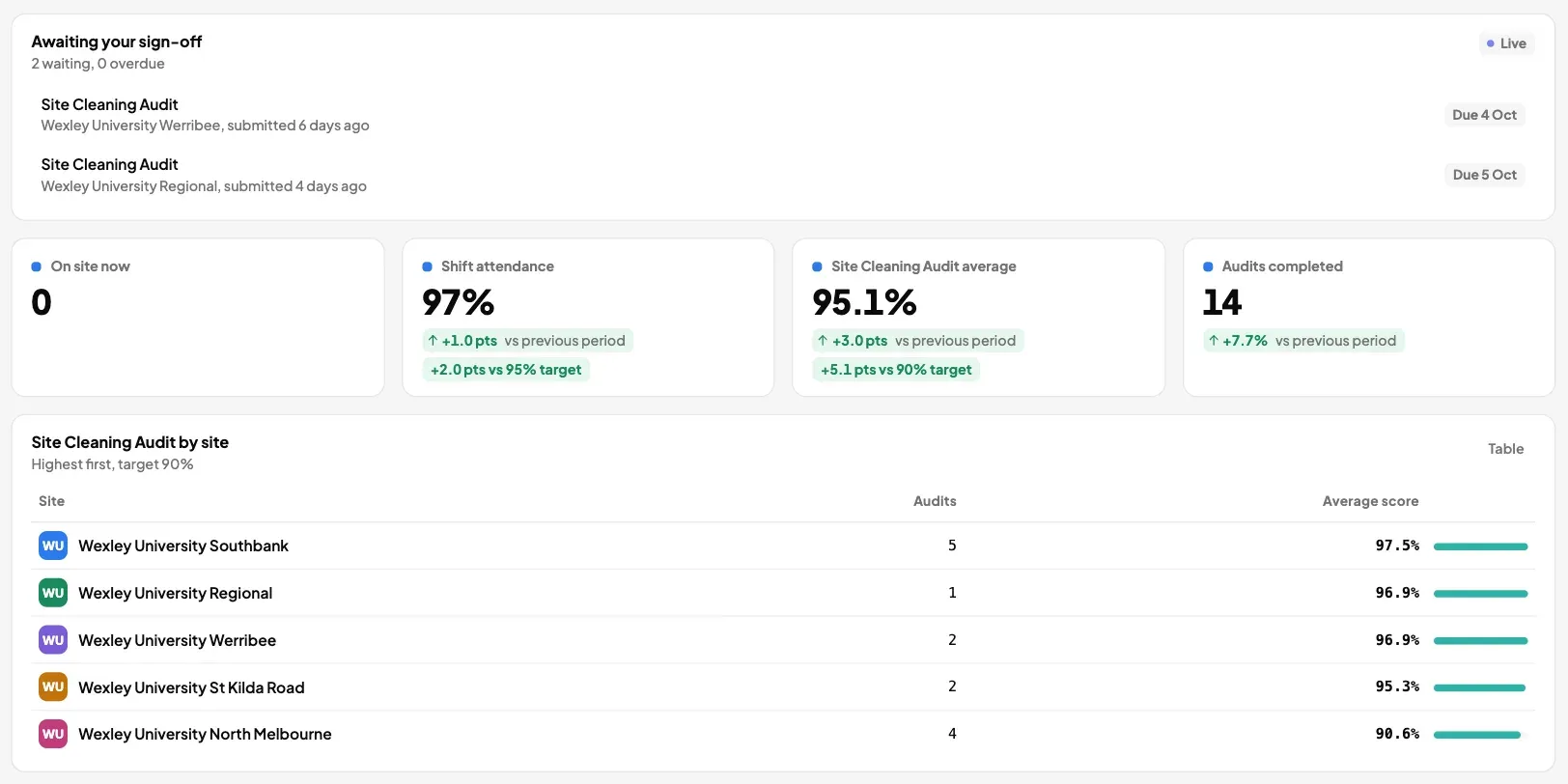
  • Every visit, before it happens. Upcoming visits at their sites, soonest first.
  • Every report in one list. Searchable by site, each one a PDF they can keep.
  • Sign-off. Your client marks an audit satisfactory or unsatisfactory, and the verdict stays on the record.
  • Requests, quotes and invoices. Clients raise jobs, accept quotes and see their invoices in the same place.
A client's portal dashboard: two audits awaiting their sign-off, shift attendance at 97 per cent, an average audit score of 95.1 per cent and the score for each of five sites.
A client's own dashboard in the portal. Example data.

Quoted, approved and invoiced. In one place.

Quote the extra work from the job, have your client approve it online and raise the invoice from the accepted quote.
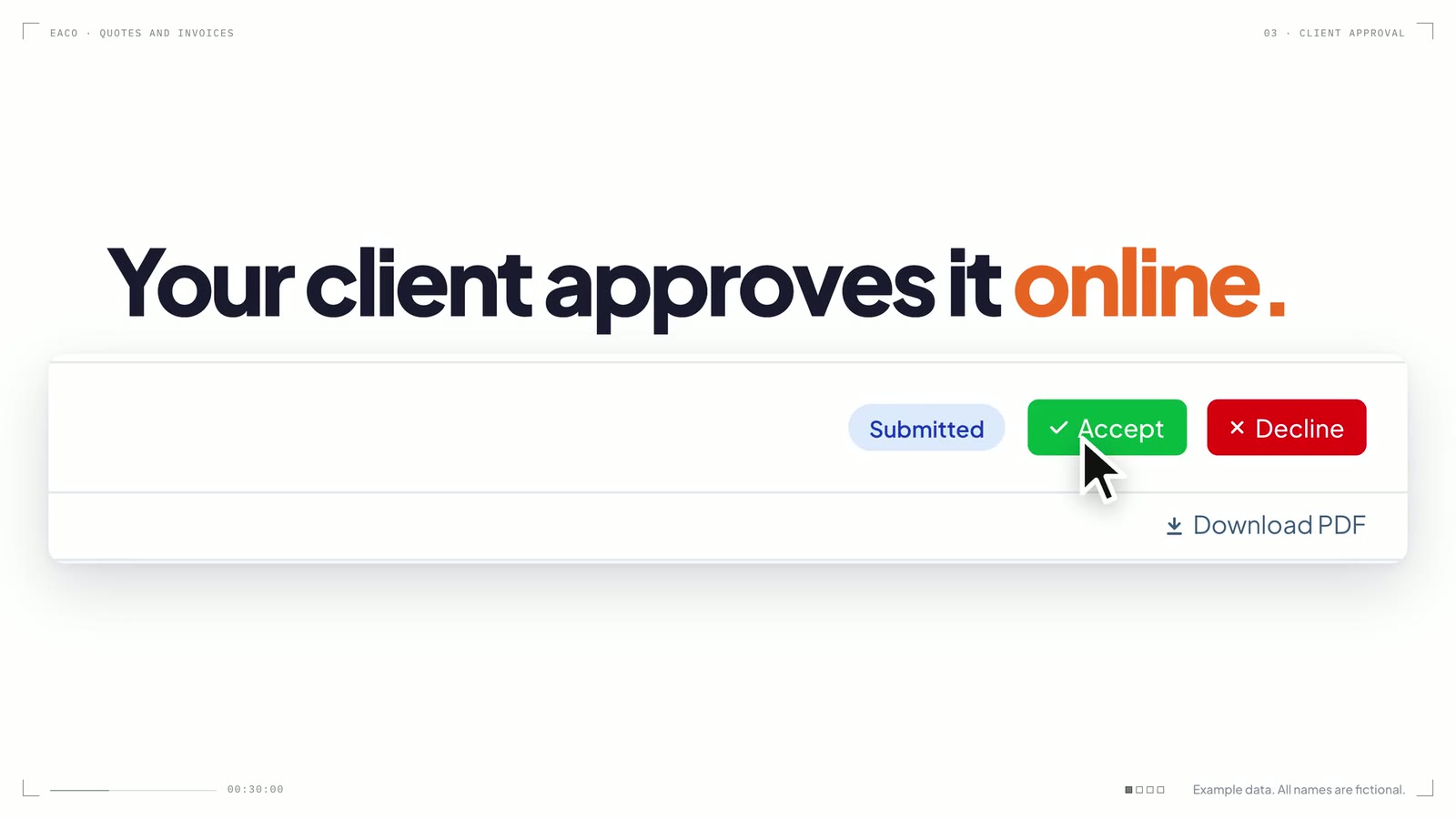
  • Quoted at your agreed rates. Lines come from your schedule of rates, and sell rates put your margin on the client's quote.
  • Approved online. Your client accepts the quote in their portal.
  • Invoiced from the quote. The accepted quote becomes the invoice, line for line.
  • Straight to Xero or MYOB. Send each invoice to your accounting file from Eaco.
A frame from the film “Quote the extra work. Keep your margin.”
Quote the extra work. Keep your margin. Sell rates on the quote, approval in the portal, the contractor bill read by Eaco AI.

Describe it, and the dashboard builds.

Ask for the numbers you run the business on and Eaco AI lays out the dashboard. Each person sees what their role allows.
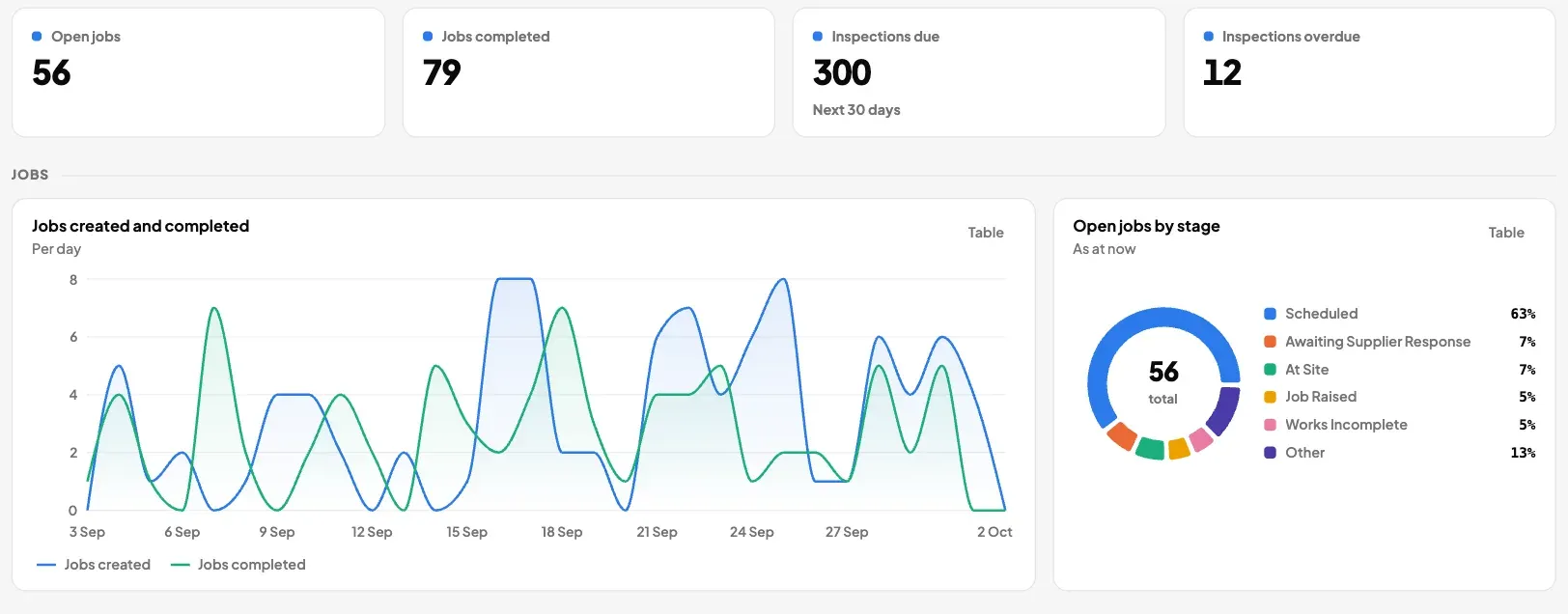
An overview dashboard for a facility manager: open jobs, jobs completed, inspections due and overdue, a chart of jobs created and completed each day, and open jobs by stage.
An overview dashboard for a facility manager. Example data.
  • Jobs, workforce, assets, compliance and finance. Panels read from the same record the work is done on.
  • Change it by asking. Or drag and resize the panels yourself, or start from a template.
  • Compare with the last period. Seven days, 30 days, 90 days or 12 months against the one before.
  • A dashboard for your client. Give each client their own in the portal.

The whole job, on the phone they already carry.

The Eaco app for iPhone and Android. Check in on site, fill the form, attach the photos and close the job.

  • Site check-in. GPS check-in and check-out, with the tasks and forms for that site.
  • Keeps working without signal. Check-ins and the forms filled with them are saved on the phone and sync later.
  • Jobs, schedule and chat. The day's shifts, the jobs assigned to you and the conversation about each one.
  • For contractors too. Contractors see offers of work and accept them in the app.

Set the rules once. Every job moves itself.

Workflow rules, notifications and your accounting file take care of the routine steps, so nobody has to remember them.

  • Workflow rulesWritten in plain language. When a contractor accepts, gives an ETA, checks in or checks out, the job moves to the next stage.
  • Contractor matchingApprove a request and Eaco offers it to a matching contractor in your network.
  • Programmed jobsEach planned visit is raised as a job before it is due, at every site on the programme.
  • Form notificationsEmail a person or an address when a form is submitted or signed off, for every response or only for flagged answers and low scores.
  • Roster messagesPublish the week and message the people on it from a template you wrote.
  • Xero and MYOBSend invoices to your accounting file from Eaco, one at a time or as each one is approved.

Your own team, at a glance.

Safety and risk records sit with the work: who is cleared, which job needs what, and what was reported on site.
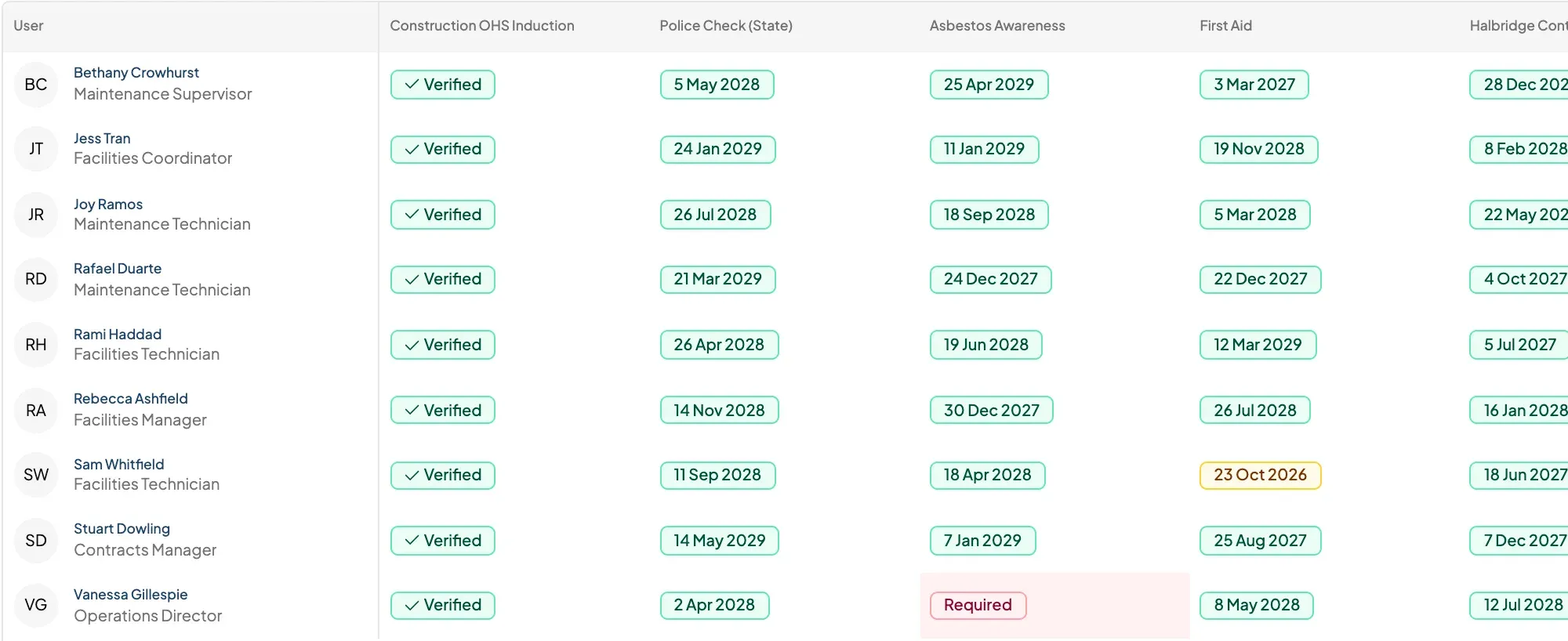
  • One matrix for your people. Police checks, inductions, first aid and licences for each person, with what is due soon and what is missing.
  • Requirements on every job. A job lists the papers it needs, and contractors are checked against them when they accept.
  • Hazards and incidents, reported on site. As forms with photos, typed or spoken, and flagged answers can email the right person.
  • SWMS and inductions. Build them as forms and have each person sign on their phone.
How contractors are checked
A compliance matrix: nine staff down the side, inductions, police checks and licences across the top, and a verified tick or an expiry date in each cell.
The compliance matrix for your own staff. Example data.

See your week running in Eaco.

Tell us how you work today. We will walk you through the same week in Eaco: the roster, the jobs, the proof and the invoice.

Example data. All names are fictional.